
Hustle & Flow
Put @prompt in the source file instead of @file in the prompt dialog.
That is the simple premise behind inline prompting, so that interacting with AI integrates with rather than disrupts my existing workflows. In most applications AI feels bolted on. Awkward. Intrusive.
I’m old school, my “IDE” is emacs in one half of a split screen terminal window and bash in the other. That is the most productive development environment for me. Anything that pulls me away from the keyboard and looking at the code slows me down, whether it is navigating to a separate app, picking a menu item, or typing text in a dialog box. Inline prompting allows me to write prompts for the coding agent inside the work product itself and stay in flow, then execute all inline prompts with a single command or keystroke.
// - inline prompts looks like the following:
//
// @codex
// - implement this method to reverse the elements of a vector
vector<string> &Foo::reverse(vector<string> &in) {
  // - the coding agent fills in the body of the method, not shown here
}
Given that I live in emacs and bash, shell scripts were the natural choice to implement processing of inline prompts. I can execute from the bash terminal, or bind to a expression in emacs, and bind the expression to a key sequence.
#!/usr/bin/bash

set -euo pipefail

# - omitted for brevity, other shell commands could be executed here and
#   results used in constructing the prompt below
# - ditto for command line arguments, especially useful for passing context
#   from the IDE

codex exec -m gpt-5-codex --sandbox workspace-write <<'EOF'
- find source files in this repository with the tag @codex in comments
- the comments following the @codex tags are instructions for you
- instructions end with the comment block or tag @end
- generate a session timestamp at the beginning of each session in the form
  YYYY-MM-DD HH:mm
- after you make modifications related to a particular @codex tag,
  add the session timestamp after the @codex tag
- only update for @codex tags without revision timestamps; those with
  revision timestamps are from previous sessions
- record the revision timestamp in the comment block marked @revision
  with one revision per line with a brief summary of the revisions
- comment code copiously for human review, in particular any block
  larger than a dozen lines
- mark your changes with a @review tag with the session timestamp
- src/template.h and src/template.c are provided as style guides and should be followed
  especially when adding new source files, classes, methods, functions, or
  variables; these templates should also be used in refactoring when
  moving methods etc.
EOF
While I edit code in emacs, I do love the visual debuggers in IDEs over gdb and lldb and use CLion for its cross platform support. I can’t speak to all IDEs, but CLion allows easy integration of shell scripts as External Tools with macros like $FilePath$ to pass IDE context to the shell script. Many of the other apps and IDEs I peeked at supported customizations, but felt klunky and bolted on and less powerful, flexible, and portable than simple shell scripts.
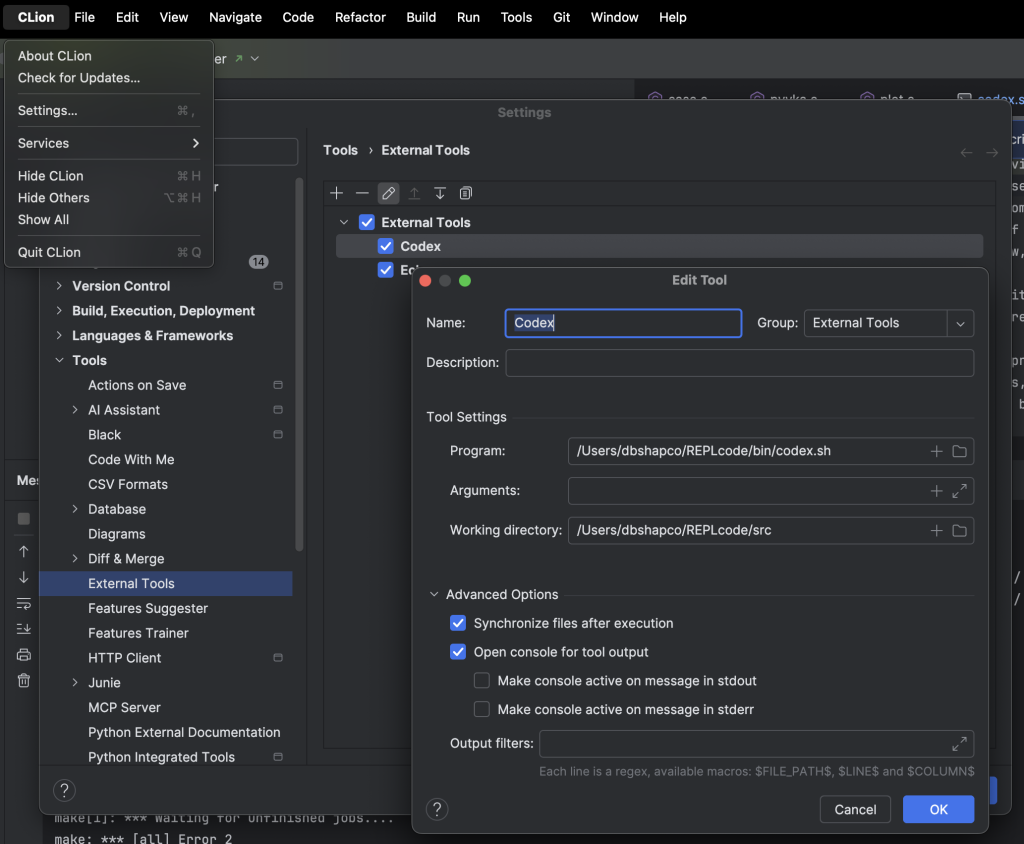
Inline prompting leverages existing models for this interaction, using @mentions to mark prompts (and I used several in addition to @codex: for instance, @doxy, @review and @refactor), and can leverage #hashtags or other markup as prompting shorthand (for example, there could be #hashtags for common @refactoring tasks like #rename). Inline prompting also follows tools like doxygen by putting all the meta text in code comments. It’s old wine in new bottles, having coding agents adopt existing patterns rather than inventing.
The way AI and coding agents are implemented in some user interfaces is so intrusive that it becomes a distraction and I turn off AI features wholesale. I want a relationship modelled after the one an author might have with an editor — instead of hovering annoyingly over my shoulder during the creative process, interrupting me every few minutes with yet another unwelcome suggestion, let’s communicate via mark up text in the “margins” of the document. Without going into detail, I also believe inline prompting is a superior model for other disciplines — think of how interaction with a human reviewer would be structured, and model AI interaction after that
REPL Coding
At scale software engineering is an iterative process, and the majority of the work is iterative refinement of existing code to modify, extend, or correct existing functionality. Iterations have become progressively tighter from the era of waterfall, through the age of Agile, to Continuous Delivery and Deployment (CI/CD), and onto today’s coding agents. In essence, a software engineer is iterating in what is classically termed a read-eval-print-loop (REPL) with a coding agent as a pair programming bot.
Inline prompting streamlines REPL and permits precision control, targeting, and scoping by colocating coding agent prompts with code. It better supports co-mingling hand crafted and generated code. The prompts can also remain as artifacts in the code and solve a common question and complaint, what prompts were used to generate this code? As a matter of housekeeping I do clean up older inline prompts knowing I can always find them again in revision history. I also prompt the coding agent to add a @revision tag with a timestamp and brief comment on change to a source file.
Over time the set of scripts will become fine tuned for the most common tasks, customized and optimized for specific workflows, with prompting compacted into specialized @tags and markup elements, making for efficient interaction with a coding agent as a pair programming bot.
In Conclusion
It’s a pretty simple idea. Put prompts inline with the source code. Use a shell script to process the inline prompts. Integrate the shell scripts with your editor or IDE. Or just run from a shell. It was born of frustration with the friction of interacting with coding agents and wanting to keep my workflow streamlined.
I put some sample scripts and source code in a github repo called REPLcode.
Leave a Reply